

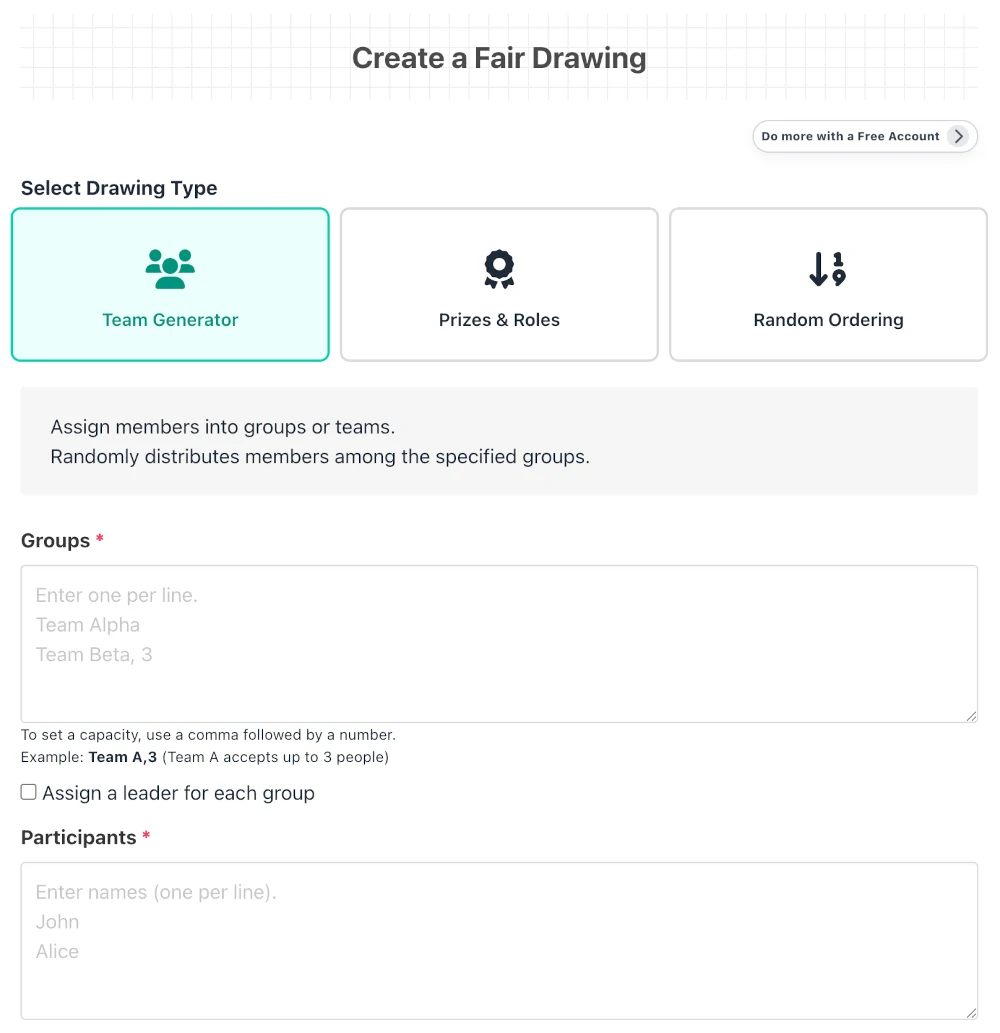
Draw Type
Choose the best drawing method from the three options below to suit your needs.
Team Generator
Randomly sorts participants into multiple teams or groups. Ideal for sports teams, event group work, changing seats, etc.
Prizes & Roles
Randomly decides winners of presents or roles like leader/organizer. Assigns the entered candidates (prizes or roles) to each member.
Random Ordering
Randomly changes the order for presentations, interviews, etc. Effective when a simple, unbiased fair order is needed.
Setting Groups, Candidates, and Members
Groups / Candidates: Enter the destination names (team name, prize name, role, etc.) one per line. For prize draws, you can specify the number of winners (quantity) by entering it after the item name, like "Prize A,3".
Members: Enter the names of everyone participating in the draw, one per line. Duplicate names will cause an error, so distinguish people with the same first and last name.
Choose a leader for each group: An optional feature to randomly select 1 leader from each group when dividing teams.
Operation Check (Draw Image)
Pressing the "Operation Check" button lets you simulate the current settings. Once the ROOM is created, you cannot change members or draw contents, so check as many times as you want until you are sure your settings are correct.
Creating a ROOM
Title & Description: Clearly convey what the draw is for. This is important information shown first when sharing the URL.
Draw Time: Set a future date and time in 1-minute increments. At the set time, the system will automatically execute the draw and publish the results all at once.
Visibility Settings: Choose whether to restrict access to a specific group using "Unlisted (Link Only)" or configure advanced security settings.
Business Member Exclusive Features
Available when more advanced security or operational management is required.
- IP Restriction: Allow access only from specific IP addresses like your office or location.
- Access Password: Require a password to access, preventing leaks to unauthorized individuals.
- Email Notification: Send notification emails to the organizer when the draw is confirmed or at a prior timing.
Fairness Rules (Important Operational Matters)
To ensure the reliability of the Draw Room, please adhere to the following rules.
- Thorough Prior Sharing: Share the ROOM URL with everyone involved before the draw time arrives.
- Organizers Cannot Check Beforehand: Until the draw time, even the creator cannot know the result.
- Reassuring Operation: By sharing the URL in advance and letting everyone know "when and under what conditions the draw will occur", you can achieve a fair draw completely free of fraud or doubt.
The state where "everyone knows the URL and draw conditions in advance" is the key to maximizing fairness.
Detail Screen Features
Awaiting Draw Screen
- Copy: Bulk copy the URL, title, and announcement time. Use this to share with stakeholders via chat tools or social media.
- Countdown: The remaining time until results are published is shown in real-time in seconds.
Draw Results and Data Utilization
When the set date and time arrive, results will be displayed all at once.
- Display Draw Results: Confirmed results are published in a list. Results are locked by the system and cannot be altered later.
- CSV Download (Business Member): Save result data in CSV format to utilize for communication, record management, and aggregation tasks.
Management Features
Admin Password and Management
You can perform the following operations using the "Admin Password" set when creating as a guest, or by logging in as a member.
Edit / Delete ROOM: You can modify the title and description, or delete unnecessary ROOMs. *To maintain fairness, draw contents and times cannot be changed.
Duplicate ROOM (Business Member): You can create a new draw carrying over the same settings. Useful for regular events.
Archive Settings (Business Member): You can end public access while keeping the results, setting it so only the creator can view it.
A truly fair draw system with cryptographic strength
The Draw Room employs a cryptographically secure random number generation logic used in modern encrypted communications. Its mathematically proven high unpredictability completely eliminates external guesswork and arbitrary manipulation, providing the highest level of fairness.